
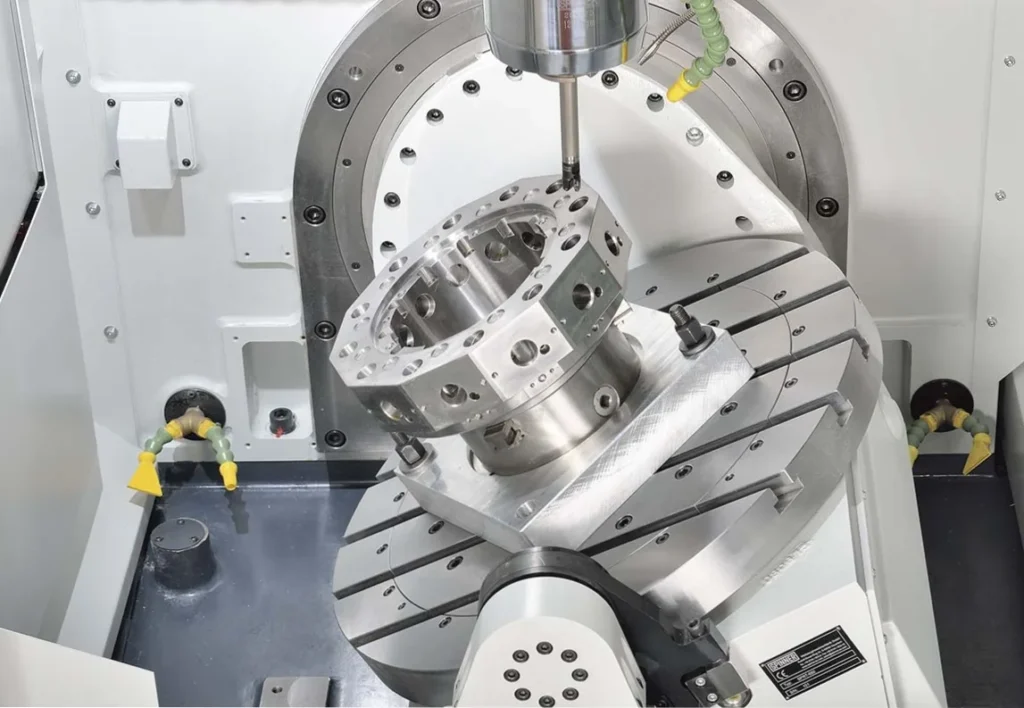
How do you choose the right 5-axis CNC machine for your shop?
Start with the parts you actually run, not the flashiest spec sheet. The right 5-axis machining center depends on your typical part size, weight, feature access, tool length, and whether you’ll mostly run 3+2 or true simultaneous work. For most job shops, the best choice is a machine that gives you reliable five-sided access, enough clearance at full tilt, practical workholding options, and a configuration that matches your real production mix.
Before buying, ask the dealer specific questions about Y-axis travel, spindle-to-table clearance at 90°, tool length limits, part-weight capacity, and ATC size – because those details determine whether the machine will actually run your work efficiently.
5-Axis CNC Machining Centers: The Complete Buyer’s Guide for Job Shops
If you’re still running multi-setup jobs on a 3-axis machine tool while your competitors are completing the same parts in one or two operations, you already know the pressure you’re under. Batch sizes are shrinking, lead times are tightening, and customers aren’t ordering six months out anymore – they need parts when they need them.
The shops winning that business aren’t necessarily bigger, they’re more efficient. And in most cases, that efficiency runs through a 5-axis machining center.
This guide is built for shops that are serious about making the move, whether you’re evaluating your first 5-axis purchase or trying to make sure the machine too you’re eyeing is actually the right fit for the work you run. We’ll cover the business case, the configuration differences that actually matter, workholding strategy, CAM software (including how AI is changing the equation), and a set of FAQs aimed at the questions buyers are really wrestling with.
What’s Driving 5-Axis CNC Machine Adoption
The market pressure behind 5-axis growth isn’t complicated. Three forces are pushing shops toward it simultaneously.
Batch sizes are getting smaller. Purchasing agents aren’t ordering large quantities the way they used to. Smaller runs mean you need to recoup setup time faster and every additional op is overhead that eats into margin on short-run work.
Delivery windows have compressed. Just-in-time manufacturing means customers want parts when they need them, not on a schedule they projected six months ago. The ability to react quickly, to jump off one job and turn around a critical run, is a competitive advantage that 5-axis enables.
Lead times can change without warning. A customer who has you running a series of parts can suddenly need you to drop everything and address something else. That’s a lot easier to manage when you’re doing one or two operations per part rather than six or seven.
3+2 vs. Simultaneous 5-Axis – Know the Difference Before You Buy
One of the most important things to understand before purchasing a 5-axis machine is that “5-axis” covers two fundamentally different types of work. Conflating them leads to buying the wrong machine – or overcomplicating a purchase that should be straightforward.
3+2 Machining (Five-Sided / Positioning)
In 3+2 machining, two rotary axes position the part (or the head) at a fixed angle, then lock it down. From that point, you’re doing standard 3-axis machining. The machine isn’t moving all five axes simultaneously – it’s using the additional axes to position and hold, then cutting normally.
This is what’s driving the vast majority of 5-axis CNC machine sales today. Most shops think they don’t have 5-axis work, but they’re already doing five-sided work. They’re just doing it the hard way: building angle fixtures, running multiple setups, re-indicating parts between operations.
3+2 is easy to program, cuts faster than simultaneous (because you’re not limited by the speed of a tilting axis), and eliminates collision concerns mid-cut since the part isn’t moving once it’s locked.
Simultaneous 5-Axis
Simultaneous machining moves all five axes at the same time. This is required for truly complex geometry – impeller blades, turbine components, organic sculptural surfaces, and parts with undercuts that simply can’t be reached from a fixed orientation.
The benefits are real: better surface finish (because you can tilt the tool to keep cutting on the flutes rather than dragging on the bottom center of an end mill), longer cutting tool life, and access to features that are geometrically impossible any other way.
But simultaneous also requires a full CAM system with 5-axis toolpaths, more programming expertise, and a higher bar for machine capability.
Which Do You Actually Need?
For most job shops, the honest answer is start with 3+2. The ROI is immediate, the learning curve is manageable, and it opens the door to simultaneous work later without making that jump feel overwhelming.
| 3+2 (Five-Sided) | Simultaneous 5-Axis | |
|---|---|---|
| Primary use case | Multi-side machining, compound angles | Complex surfaces, impellers, undercuts |
| Programming complexity | Low – standard 3-axis after positioning | High – requires full 5-axis CAM toolpaths |
| Feed rate | Full linear feed rates available | Limited by slowest (tilting) axis |
| Collision risk | Low – part locked during cutting | Higher – continuous motion management required |
| CAM requirement | Optional (conversational controls can work) | Required |
| Best entry point for job shops | ✓ Yes | Not ideal as a first step |
The Numbers Don’t Lie – Real Time Savings
The business case for 5-axis isn’t theoretical. Here’s a real-world comparison using the same part run on a 3-axis machine versus a 5-axis machine in a five-sided operation:
| Metric | 3-Axis (7 Operations) | 5-Axis (2 Operations) | Improvement |
|---|---|---|---|
| Total setups | 7 | 2 | 71% reduction |
| Setup time | 5 hrs 30 min | 1 hr 30 min | 4 hours saved |
| Total cycle time | 19 min 47 sec | 13 min 4 sec | ~6 min 43 sec faster |
| Fixture requirements | Custom wedge fixture required | Standard workholding | Eliminated |
The setup time savings were expected as fewer operations means less time re-indicating and re-clamping. What surprised many shops is the cycle time drop.
When a single tool can hit all five sides of a part without being changed out between operations, you eliminate the redundant tool changes and repositioning moves that add up across seven separate ops. The more setups you’re collapsing, the bigger this effect becomes.
That time savings translates directly to money: either improved margin on existing jobs, or the ability to offer more competitive pricing to protect and grow customer relationships.
What to Consider Before You Purchase
Buying a 5-axis machine requires more due diligence than buying a 3-axis machine. The question isn’t just “what’s the biggest machine I can afford?”, it’s whether the machine’s geometry actually fits the work you’re going to run.
Part Size vs. Machine Size
On a trunnion-style machine, when the table rotates to 90 degrees, the spindle has to reach down over the trunnion body. If your table diameter is much larger than the parts you’re running, you may find that standard-length tools cause clearance issues with the casting or way covers – forcing you to use longer, less rigid tooling. Match your table size to your typical part family, not your largest outlier.
Y-Axis Travel and Part Height
This is one of the most overlooked spec questions. When your part is tilted to 90 degrees and you’re machining what was the top face, you’re consuming Y-axis travel.
The critical measurement to get from any dealer: the distance from the table face (at 90°) to the spindle center at maximum negative Y travel. That number tells you the maximum part height you can fully machine at full tilt. If your parts are taller than that dimension allows, you will run out of travel before you finish the part.
Tool Length and Clearance
On swivel-head machines especially, long tools in positive X positions can run out of travel as the head tilts. Know your longest tool in each job family and confirm the machine can physically clear it at the required angles. This is a spec conversation to have with your dealer before signing anything.
Part Weight
Trunnion-style configurations tilt the part, which places physical limits on how heavy a workpiece can be. Swivel-head and articulating-head configurations move the spindle instead, letting the part sit stationary on the table, which dramatically increases the weight capacity. If you’re running heavy workpieces, configuration choice may be non-negotiable.
Tool Changer Capacity
Most 5-axis work typically requires more tools than 3-axis because you’re consolidating multiple operations. However, many of those tools are shared across operations, so the tool count doesn’t scale linearly with op count.
A 30-tool ATC is a reasonable starting point for many shops, but if you’re running highly specialized multi-sided work, 60+ positions give you meaningful flexibility.
| Consideration | Key Question to Ask Your Dealer |
|---|---|
| Table size | What’s the recommended part size range for this table diameter? |
| Y-axis travel | What’s the max part height I can fully machine at 90°? |
| Tool clearance | What’s the max tool length at full X travel with the head at 90°? |
| Part weight | What’s the max workpiece weight at full tilt? |
| Tool changer | What ATC sizes are available and what’s the cost delta? |
Machining Center Configurations Explained
There are five primary 5-axis configurations you’ll encounter in the market, plus one retrofit option. Each has genuine advantages and real trade-offs. Here’s how to think about them.
AC Trunnion (Table-Table)
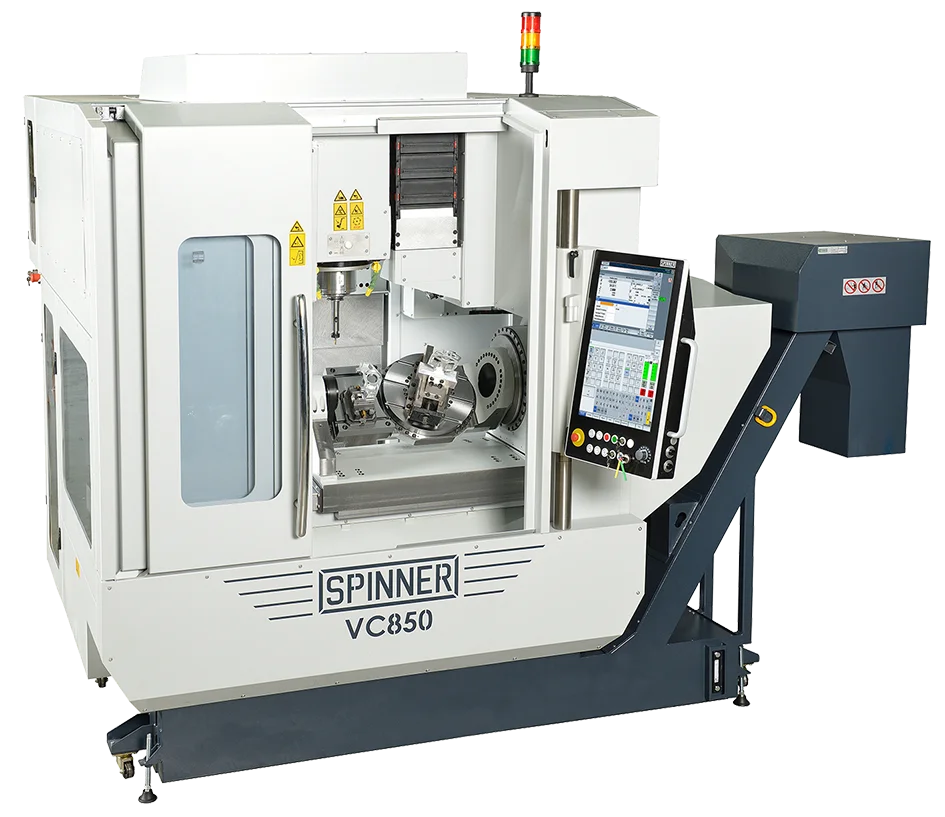
The most recognizable 5-axis configuration. The A-axis tilts the table; the C-axis rotates it. Both axes live in the table with the spindle being a standard vertical head. The SPINNER VC850-5A is an AC style, with an added side-table for completion of the sixth side.
Best for: Shops new to 5-axis who want an intuitive transition from 3-axis. The motion is easy to visualize, programming is straightforward, and the machine handles 3+2 work exceptionally well.
Watch out for: The tool approaches from behind the trunnion when tilted to 90°, which creates clearance issues if your table is oversized for your typical part. Undercut capability exists, but typically only in one direction (toward the operator). Part weight is limited because you’re physically tilting the workpiece.
BC Trunnion – Standard (Table-Table)

The B-axis tilts along the Y-axis and the C-axis rotates under Z. The key difference from an AC trunnion is the tool always approaches from the side rather than over the top of the trunnion body. The SPINNER U5-630 is a BC trunnion style 5-axis CNC.
Best for: Shops that want trunnion simplicity but need more flexibility with tool length and part size. Because you’re not reaching over the trunnion body, you can use shorter, more rigid tooling with a wider range of part sizes.
Watch out for: The center of rotation sits close to the table surface on some models, which limits how tall a part you can run at 90°. Ask for the X-travel-to-centerline distance before buying.
BC Trunnion – Fixed Table (Ultimate Flexibility)
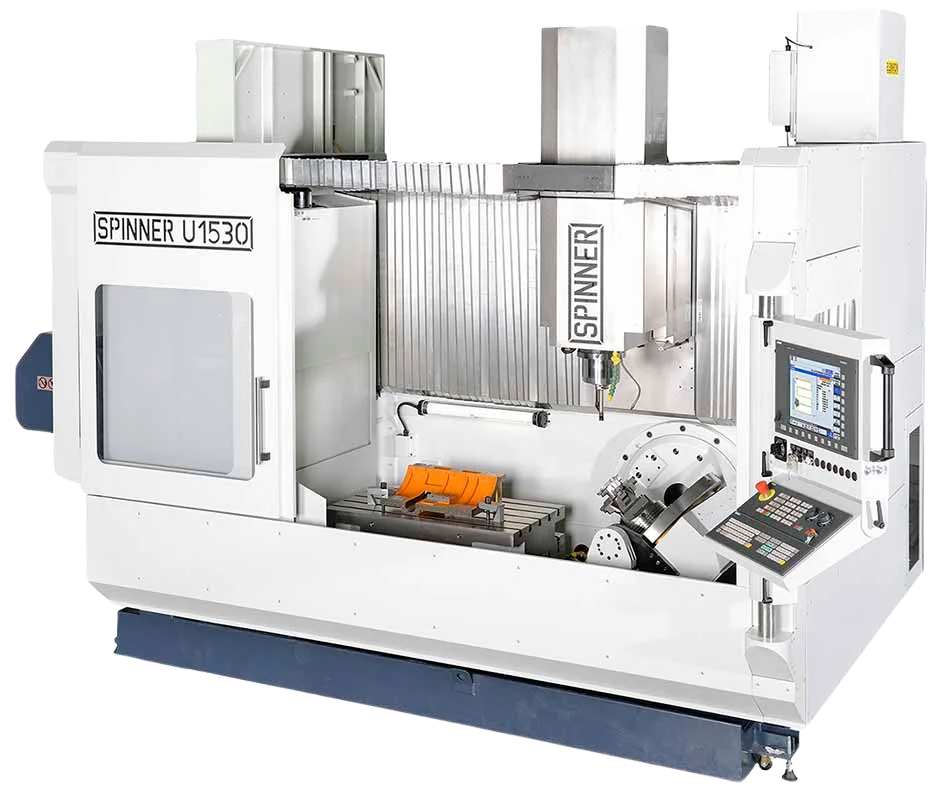
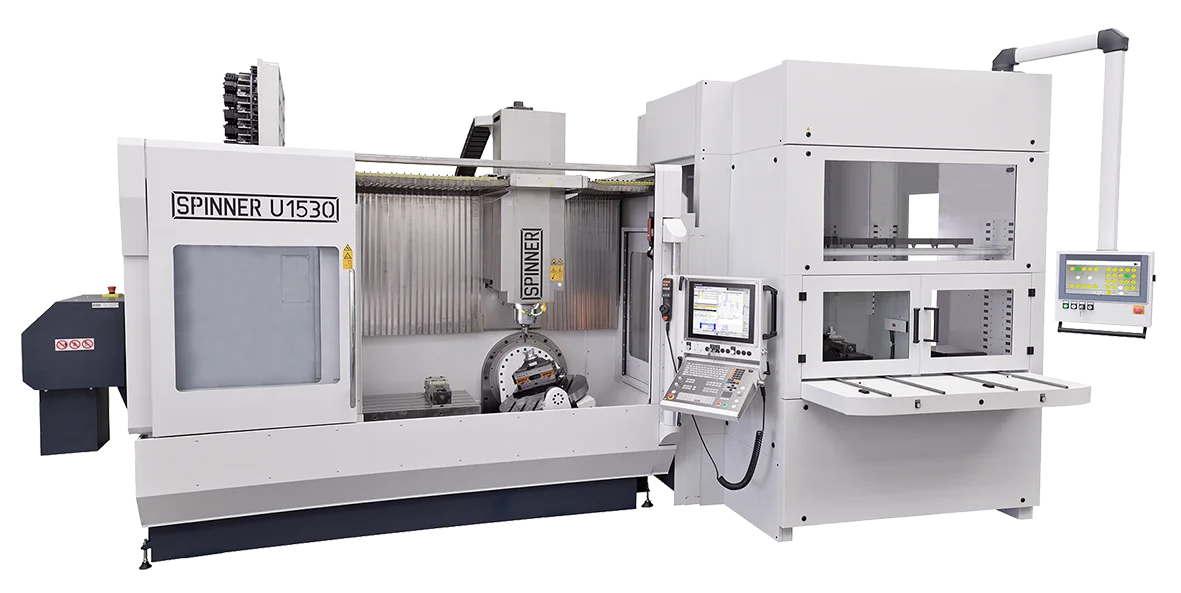
The B-axis tilts along the Y-axis and the C-axis rotates under Z. The key difference from an AC trunnion is the tool always approaches from the side rather than over the top of the trunnion body. Combine this with a large fixed table and you get the ultimate in flexibility. The SPINNER U5-1530 is a BC trunnion – fixed table style 5-axis CNC.
Best for: Shops that want all the advantages of the BC trunnion combined with the ultimate flexibility of a fixed table. The large fixed table allows for a 6th side operation, long 3-axis parts, or to hold a tailstock for rotary work on the trunnion.
Watch out for: The center of rotation sits close to the table surface on some models, which limits how tall a part you can run at 90°. Ask for the X-travel-to-centerline distance before buying. Takes up more floor space than a standard BC trunnion.
BC Cantilever / Universal (Table-Table)
A BC-style trunnion with a wider, more usable table surface – often with a support arm depending on the model. The center of rotation sits higher above the table surface, giving you more room for taller parts at full tilt.
Best for: Job shops that don’t know exactly what’s coming through the door. The large, flat table accommodates vises, pallets, and custom fixtures without the constraints of a smaller round trunnion. Undercut capability in both directions. Strong all-around machine.
Watch out for: Usually fewer size options available than AC trunnions, so confirm the work envelope fits your range before committing.
BC Swivel Rotate (Head-Table)
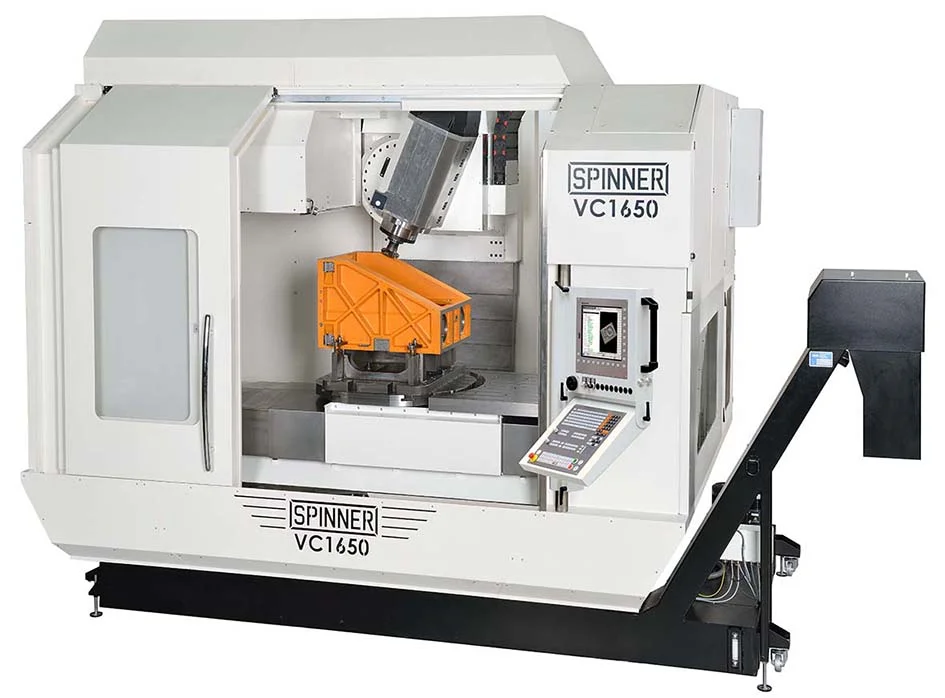
The head tilts (B-axis, typically beyond 90° in both directions) while the rotary is built into the table (C-axis). This is a head-table configuration – the part doesn’t tilt, the spindle does. The SPINNER VC1650-5A is a BC swivel head style 5-axis CNC.
Best for: Shops running heavier parts, plate work, or wanting maximum versatility. Because the part stays on the table, weight capacity goes up significantly. The flat table section next to the rotary lets you run three-axis work or prep parts for five-sided operations without moving to a different machine.
Watch out for: When the head is at 90°, you need to know how close the tool center can get to the table surface. That measurement determines how much part and fixture height you can accommodate on the rotary. Tall setups can conflict with head clearance on the flat table section.
Articulating Head (Head-Head)
Both the tilt and rotation happen in the head. Typically found on large bridge-style machines built for heavy, oversized workpieces that cannot be tilted or rotated on a trunnion.
Best for: Large-format work in aerospace, energy, or heavy industry. If you’re machining components measured in feet rather than inches, this is often the only viable architecture.
Watch out for: Same spindle-to-table clearance question applies – confirm the distance from spindle centerline at 90° to table surface. Not a typical job shop purchase.
Add-On Rotary Table (Table-Table)
A bolt-on rotary table unit that converts an existing 3-axis machine to 5-sided capability. Available in AC, BC, and AB configurations depending on how it’s mounted.
Best for: Shops that want to test 5-axis workflow without replacing a machine, or that have a capable 3-axis machine with remaining life.
Watch out for: The trunnion unit consumes Z-axis travel – sometimes significantly. Part and fixture height is constrained by the trunnion height plus remaining Z clearance. Weight capacity is limited. Think of this as a capability test, not a full replacement for a dedicated 5-axis machine.
| Configuration | Motion Type | Part Weight Limit | Undercut Direction | Best Fit |
|---|---|---|---|---|
| AC Trunnion | Table-Table | Moderate | One direction | 5-axis newcomers, small-medium parts |
| BC Trunnion (Standard) | Table-Table | Moderate | Both directions | Standard tool length, varied part sizes |
| BC Trunnion – Fixed Table | Table-Table | Moderate-High | Both directions | Ultimate flexibility for job shops |
| BC Cantilever / Universal | Table-Table | Moderate-High | Both directions | Job shops, general purpose |
| BC Swivel Rotate | Head-Table | High | Both directions | Heavy parts, plate work, versatility |
| Articulating Head | Head-Head | Very High | Both directions | Large-format / heavy industry |
| Add-On Rotary Table | Table-Table | Low | Varies | Retrofit / capability test |
Workholding Strategies for 5-Axis
Workholding is where a lot of shops leave money on the table after buying a 5-axis machine. If you’re holding one part at a time in a centering device and calling it a day, you’re capturing maybe 30% of the machine’s potential.
The mindset shift is in 5-axis, your workholding is part of the manufacturing strategy, not an afterthought.
The Centering Vise
For most shops starting out, a centering (self-centering) vise is the most versatile and flexible entry point. It grips from both sides simultaneously, gives you good clamping range without secondary operations like cutting dovetails into your stock, and leaves five sides of the part accessible. Start here.
Palletized and Modular Systems
OEM-style pallet systems let you swap fixtures rapidly between jobs with high repeatability. The ability to pre-set up the next job while the machine is cutting the current one is where you start to see real throughput gains. Dovetail fixtures nested inside larger pallets extend this further – one fixture can accommodate a wide range of part sizes.
Multi-Part Fixturing
A 5-axis machine doesn’t require you to run one part at a time. Custom fixtures, even simple ones you make in-house, can hold multiple parts simultaneously. A round plate with parts arrayed around the circumference, for example, lets you run one tool over all of them before changing. Every part that comes off complete when you open the door is money.
The Vise Rotation Trick
One of the simplest and most overlooked wins: if you’re running three vises on the table the same way you would on a 3-axis machine, you’re blocking access to the part sides. Rotate each vise 45° on the table. You now have clear access to all five sides of every part without changing fixtures or adding hardware.
Lights-Out with Automation
Once you’re comfortable with multi-part fixturing, automation starts to make sense. Pallet changers, robotic load/unload, and fixture towers can keep your spindle cutting overnight without anyone in the building. For shops with limited headcount, this is one of the most compelling ROI arguments for 5-axis.
CAM Software, Controls, and AI – Your Programming Toolkit
The CAM Platform Question
All of the major CAM platforms handle 5-axis well today. Mastercam, Fusion 360, Siemens NX, GibbsCAM, SolidCAM, BobCAD – they’ve all invested heavily in 5-axis toolpaths in recent years.
The platform that’s going to serve you best is almost certainly the one your team already knows. The learning curve on an unfamiliar system costs more than any feature differences between them.
That said, for simultaneous 5-axis work, a full CAM system is non-negotiable. If you’re running true simultaneous toolpaths, you need the software.
Conversational Controls for 3+2
For shops that want to start running 5-sided work without a CAM investment, conversational controls are a legitimate path. You can program transform planes to orient the part, temporarily move work zero for each face, and call in your existing 3-axis programs for each orientation. It’s not the right long-term solution for complex work, but it removes the cost barrier for shops testing the water.
AI Is Lowering the Programming Bar
The most significant development in 5-axis programming in the past few years is AI-assisted programming, and it’s arriving faster than most shops realize.
CloudNC’s CAM Assist is the clearest example. It uses AI to generate complete machining strategies and toolpaths for 3-axis and 3+2 work, turning what used to be hours of programming into minutes. One user reported getting 80% of the way through a job in 7 minutes, with another 15 minutes of fine-tuning to finish. For 3+2 work specifically, the AI’s ability to evaluate those options systematically is a meaningful advantage over manual programming.
CAM Assist 2.0 (launched late 2025) adds a step-by-step review workflow so programmers can inspect and approve AI suggestions at each stage rather than accepting a black-box output. It’s now used by over 1,000 machine shops globally and integrates directly with Fusion, Mastercam, GibbsCAM, SolidCAM, and Siemens NX – no new post-processors required.
For shops worried that 5-axis programming expertise is a bottleneck, AI-assisted CAM is changing that calculus. The barrier is lower than it’s ever been.
| CAM Approach | Best For | 5-Axis Capability | Investment Level |
|---|---|---|---|
| Conversational control | 3+2, simple parts, new shops | 3+2 only | Low |
| Existing 3-axis CAM | Shops already invested in a platform | Limited (3+2 may require upgrade) | Already sunk |
| Full 5-axis CAM | Simultaneous work, complex geometry | Full | High |
| AI-assisted (e.g. CloudNC CAM Assist) | 3+2 programming acceleration | 3-axis + 3+2 | Moderate (subscription) |
How Hard Is the Transition?
The short answer: easier than most machinists expect, but the sticking point is almost never the machine.
Three-Axis to Five-Sided
This is a very manageable jump. You’re not learning new motion or new physics – you’re learning to position the part or head to a fixed angle, lock it, and run standard 3-axis code.
Work offsets work the same way. Tool touch-off works the same way. The main new concept is thinking about which face you’re programming and how to orient your work zero for each one.
Shops that make this jump typically report that it takes a few parts before it clicks – and then it feels obvious.
Five-Sided to Simultaneous
This is the real learning curve, and it lives almost entirely in the CAM system. Learning to select the right toolpath type for a given feature, understand how tool orientation constraints work, and manage the relationship between tool tilt and surface finish takes time. It’s not dangerous or particularly difficult – it’s just a lot of new options to develop judgment about.
The recommendation from experienced programmers: don’t try to go from 3-axis to simultaneous in one jump. Use your first 5-axis machine to get comfortable with 3+2 work. Then the move to simultaneous is incremental rather than overwhelming.
Can a New Shop Start Directly with 5-Axis?
Yes – and there’s a strong argument that a new shop should start with 5-axis. A shop that’s resource-constrained (limited headcount, limited floor space, limited capital for multiple machines) gets more output per spindle from a 5-axis machine than from a 3-axis machine running multiple setups. The ROI on that investment hits faster when you’re starting from zero than when you’re trying to replace established workflows on existing machines.
Through-Spindle Coolant vs. Air Blast
For deep drilling, through-spindle coolant is hard to beat – it’s the right tool for the job. For general 5-axis milling, especially in aluminum, air blast is often the better choice. Coolant on a tilting head gets thrown in every direction, obscures your view of the cut, and makes it harder to monitor for potential collisions. Many shops default to air blast for 5-axis work and reserve through-spindle coolant for drilling operations specifically.
Frequently Asked Questions
How do I choose between an AC trunnion and a BC trunnion for my shop?
The decision comes down to three factors: tool length preferences, part size range, and undercut requirements.
An AC trunnion tilts toward the operator, which means the spindle reaches down over the top of the trunnion body when the table is at 90°. This creates clearance constraints – if your table diameter is significantly larger than your typical part, you may need longer tooling to clear the casting, which costs you rigidity. It also provides undercut capability in only one direction (toward the operator).
A BC trunnion tilts along the Y-axis, so the tool always approaches from the side. You never reach over the trunnion body, which means standard-length tooling works across a wider range of part sizes. You also get undercut capability in both positive and negative tilt directions, which opens up more complex geometry. The trade-off on some BC designs is that the center of rotation sits close to the table surface, which can limit how tall a part you can fully machine at 90° – always ask for the X-travel-to-centerline-of-rotation measurement.
For a shop running a variety of part sizes, a BC configuration (particularly cantilever/universal style) typically offers more flexibility. For a shop with a well-defined part family that fits the trunnion’s geometry, an AC trunnion is a proven, cost-effective choice.
What part characteristics are best suited for 3+2 vs. simultaneous 5-axis?
The geometry of the part is the determining factor – not the industry, and not the material.
3+2 is the right choice when:
- The part has flat faces, pockets, holes, or features that can be fully machined from a fixed orientation
- You need to work on multiple sides of a part that would otherwise require re-fixturing
- The part has compound angles that are expensive to hold with conventional fixtures
- The part has deep cavities where tilting to a fixed angle lets you use a shorter, more rigid tool
Simultaneous 5-axis is required when:
- The part has true ruled or sculptural surfaces – impeller blades, turbine vanes, organic forms – where the tool must stay normal to a constantly changing surface
- Undercuts exist that cannot be reached from any fixed orientation
- Surface finish requirements demand continuous tool tilting to avoid cutting on the bottom center of the end mill (which has zero surface footage and produces poor finish)
- The feature geometry changes direction in a way that no single fixed angle can address
A useful rule of thumb: if you can draw a line on the part and say “the tool needs to come from this direction to machine this feature,” you’re probably in 3+2 territory. If the direction the tool needs to point is constantly changing as it moves along a surface, you’re in simultaneous territory.
Many complex parts use both strategies: rough in 3+2 for material removal speed, finish in simultaneous for surface quality.
Which 5-axis machine configuration is best for a job shop?
The BC cantilever/universal configuration is the most versatile choice for a general job shop environment. The wide, flat table can accommodate vises, pallets, modular fixtures, and custom workholding without the geometric constraints of a smaller round trunnion. The BC tilt axis gives you undercut capability in both directions and lets you use standard-length tooling across a wide range of part sizes. The center of rotation sits high enough above the table surface that taller parts remain accessible at full tilt.
If budget allows, the BC swivel rotate (head-table) configuration adds another level of versatility – a flat table section for plate work and 3-axis operations alongside the rotary, with no part-weight limits from tilting. It’s typically more expensive, but for a shop that regularly handles heavier workpieces or plate work, the investment pays off.
The AC trunnion is a strong choice if you’re buying your first 5-axis machine and your part family is well-defined and fits the table geometry. It’s the most intuitive configuration for machinists transitioning from 3-axis, and it’s widely available across price points.
Do I need special CAM software for 5-axis machining?
It depends on the type of 5-axis work you’re doing.
For 3+2 machining, you have options. Conversational controls on some machines let you program five-sided work without a CAM system at all – you define the part orientation and call in your existing 3-axis programs for each face. If you already have a 3-axis CAM system, check whether it includes 3+2 positioning capability – many do, and an upgrade or add-on module may be all you need. AI-powered tools like CloudNC’s CAM Assist also now generate 3+2 strategies automatically within platforms like Fusion, Mastercam, GibbsCAM, SolidCAM, and Siemens NX.
For simultaneous 5-axis machining, a full CAM system with 5-axis toolpath capability is required. There’s no shortcut here – the toolpath logic is complex enough that it needs to be computed by software that understands the machine’s kinematics. All of the major platforms (Mastercam, Fusion 360, Siemens NX, GibbsCAM, SolidCAM) handle this well.
The most important variable isn’t which platform you choose – it’s how well your team knows the one they’re on. Switching CAM systems to get a “better” 5-axis module often costs more in lost productivity than the module gain is worth.
Can AI help with 5-axis CNC programming?
Yes – and it’s already in production use at over 1,000 shops. CloudNC’s CAM Assist is the most established AI-powered CAM tool for 5-axis work, generating complete machining strategies and toolpaths for 3-axis and 3+2 operations in minutes rather than hours.
The AI understands machining rules, physics-based cutting parameters, and the combinatorial complexity of choosing approach directions for 3+2 work – which is one of the most time-consuming parts of 5-sided programming when done manually. CAM Assist 2.0 (released late 2025) breaks the process into reviewable stages so programmers can inspect and approve each AI decision before it goes to the machine.
For shops where programming bandwidth is a bottleneck – either because you don’t have a dedicated programmer, or because your programmer is already stretched – AI-assisted CAM meaningfully changes what’s achievable. It doesn’t replace programming knowledge, but it compresses the time from CAD model to machine-ready toolpath, which is often where 5-axis adoption stalls.
AI-assisted simultaneous 5-axis programming is still maturing, but for 3+2 work, it’s production-ready now.
What is the biggest challenge when switching from 3-axis to 5-axis?
The machine itself isn’t the hard part. The biggest challenge is the CAM system.
Going from 3-axis to five-sided 3+2 work is genuinely straightforward – the machining concepts don’t change, just the orientation. Most machinists work this out in the first few parts.
The jump to simultaneous 5-axis is where the learning curve lives, and it’s almost entirely a software challenge: understanding which toolpath types to use for which features, how tool orientation constraints interact with surface geometry, and how to apply simultaneous toolpaths efficiently rather than just correctly. Developing that judgment takes time and experience.
The practical recommendation: use your first 5-axis machine to run 3+2 work, get comfortable with the workflow, and let simultaneous programming develop naturally from there rather than trying to absorb both at once.
Secondary challenges worth planning for: workholding strategy (most shops underinvest here initially), and having the right probing or fixturing repeatability to make add-on tables or pallet systems work efficiently.
How does 5-axis machining improve part accuracy?
Every time you re-clamp a part, you introduce a potential error. A chip on a locating surface, slightly different clamping pressure, a stop that wasn’t fully seated – any of these can cause a measurable shift between operations. On a seven-operation job, you’ve got six re-clamping events, and those errors can stack.
In five-sided 3+2 machining, you clamp the part once (or twice, for OP1/OP2), and the machine moves the part through position. From that point, your part accuracy is limited only by the machine’s positioning accuracy – not by operator variability across multiple setups. On complex parts with tight tolerances across multiple faces, this is a significant quality improvement, not just a convenience.
What workholding do I need for 5-axis machining?
A centering (self-centering) vise is the most practical starting point. It grips from both sides simultaneously, accommodates a good range of stock sizes without secondary fixturing operations, and leaves five sides of the part accessible. For most shops buying their first 5-axis machine, this is the right tool for the first year.
From there, the upgrade path depends on your work:
- Palletized systems for high-mix shops that need fast changeover between jobs
- Dovetail fixtures for parts that will run in volume, where the setup cost pays off quickly
- Custom multi-part fixtures (often shop-made) for jobs where throughput per spindle hour is the priority
- Automation integration (pallet changers, robotic load) when lights-out running makes sense
The single biggest workholding mistake shops make on their first 5-axis machine is running vises in the same orientation they used on a 3-axis table. Rotating each vise 45° on the 5-axis table immediately opens up all five sides of the part with no additional investment.
Is 5-axis machining worth it for small batch or prototype work?
This is arguably where 5-axis delivers the clearest ROI. On high-volume production runs, setup time is amortized across hundreds of parts. On a batch of five or ten, the setup cost on a 3-axis multi-op job can exceed the actual cutting time – and that’s before you account for the cost of errors introduced by multiple re-clamping events.
For prototype work specifically, 5-axis also enables machining complex geometry from solid billet rather than requiring castings. Castings require tooling investment that’s hard to justify for low quantities or design-stage parts. A 5-axis machine can produce the same result from a block of material – faster, and without the casting lead time.
For shops running mixed work (some volume, some short-run, some prototype), the 5-axis machine typically becomes the default for short-run and prototype work almost immediately after installation.
Conclusion: Making the Decision
The right 5-axis machine is the one that matches your actual work – not the most impressive spec sheet, and not the cheapest box that says “5-axis” on the side.
Start with your part family. Know the sizes, the weights, the feature complexity, and whether you’re running 3+2 work, simultaneous work, or both. Match those requirements to machine configuration using the framework in this guide. Ask your dealer the specific questions around Y-travel, spindle-to-table clearance at 90°, and tool length limits – not just the headline XYZ travels.
Invest in workholding from day one, not as an afterthought. And recognize that the programming barrier, for 3+2 work especially, is lower than it’s ever been with AI-assisted tools accelerating the path from CAD model to first chip.
The shops that bought 5-axis three years ago are running circles around shops that are still debating it. The competitive gap only grows with time.